

Request
The Cortina payment method would send aStart command to Nayax’s servers in order to notify them about starting a transaction. The call would be of the following format:
https://lynx.nayax.com/payment/v2/transactions/cortina/(payment method's name)/start
The payload includes the following details:
Request Parameters
The following table describes the parameters included in the request body:| Field | Type | Description |
|---|---|---|
| User & Security Identifiers | ||
AppUserID | String(40) | The consumer’s user ID on the 3rd party’s app. |
TransactionId | String(40) | The unique identifier for the transaction.
|
SecretToken | String(64) | The unique secret key for your system, provided by Nayax in advance. Must be kept secret. |
Balance | Double | The balance of the user’s account. Decimal value (max 3 digits for cents). |
| Machine Identification (One is Required) | ||
TerminalId | String(255) | The Unique Identifier for the vending machine (HW-Serial of the device).
|
UniQR | String | The QR code value linked to the machine.
|
Product Selection (Products Array) | ||
Products Array | *** | The array is optional, but if provided, some inner fields are mandatory. Only relevant for the PreSelection flow. |
Code inside Products | Int(16) | The Code of the selected item.
|
PulseLineNumber inside Products | Int(32) | The pulse line number for remote vend capability.
|
Name inside Products | String(255) | The Product name as defined in the Nayax back office. |
Price inside Products | Double | The original Product price in the machine’s currency.
|
UnitOfMeasurement inside Products | String(64) | Product’s unit of measurement (e.g., ‘unit’ or ‘Liter’). |
Remote Vend: Product Selection
The following applies to the PreSelection flow only. To specify which product to vend, include a"code" field inside the "Products" array with the corresponding product index.
Pulse machine code numbering
For Pulse array machines (any Pulse configuration except Pulse Line), the "code" numbering starts from 0.For example, in case of:
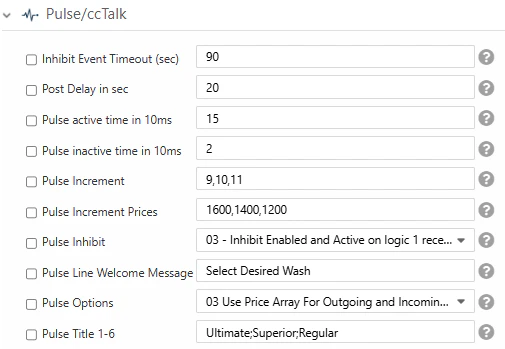
"Code": 0→ “Ultimate” product"Code": 1→ “Superior” product"Code": 2→ “Regular” product
Code: 0).
For Pulse 1–6 configurations (Pulse Line), use "PulseLineNumber" instead of "code", and the counting starts from 1 (not 0).
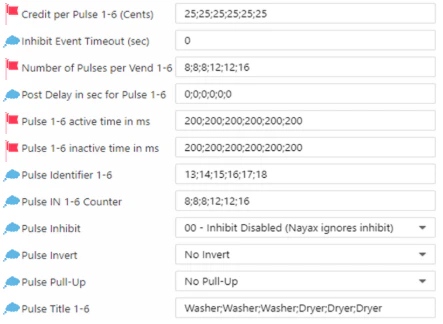
Response
TheStart Response that Nayax’s servers would send to the payment method.The payload should look as follows:
Response Parameters
The following table describes the fields returned in the API response:| Field | Type | Description |
|---|---|---|
| Transaction Status & Error Codes | ||
Verdict inside Status | String | The constant string representing the final status of the request:
|
Code inside Status | Int(32) | The Decline Code. Conditional—only present if Verdict is ‘Declined’. Valid codes include:
|
StatusMessage inside Status | String(255) | A free text field containing the transaction status message or additional varying data regarding the outcome. |
CustomDeclineCode inside Status | String | Used for specifying a custom decline code (e.g., related to Soft Decline or Switch Interface). May reflect the acquirer’s response code. |